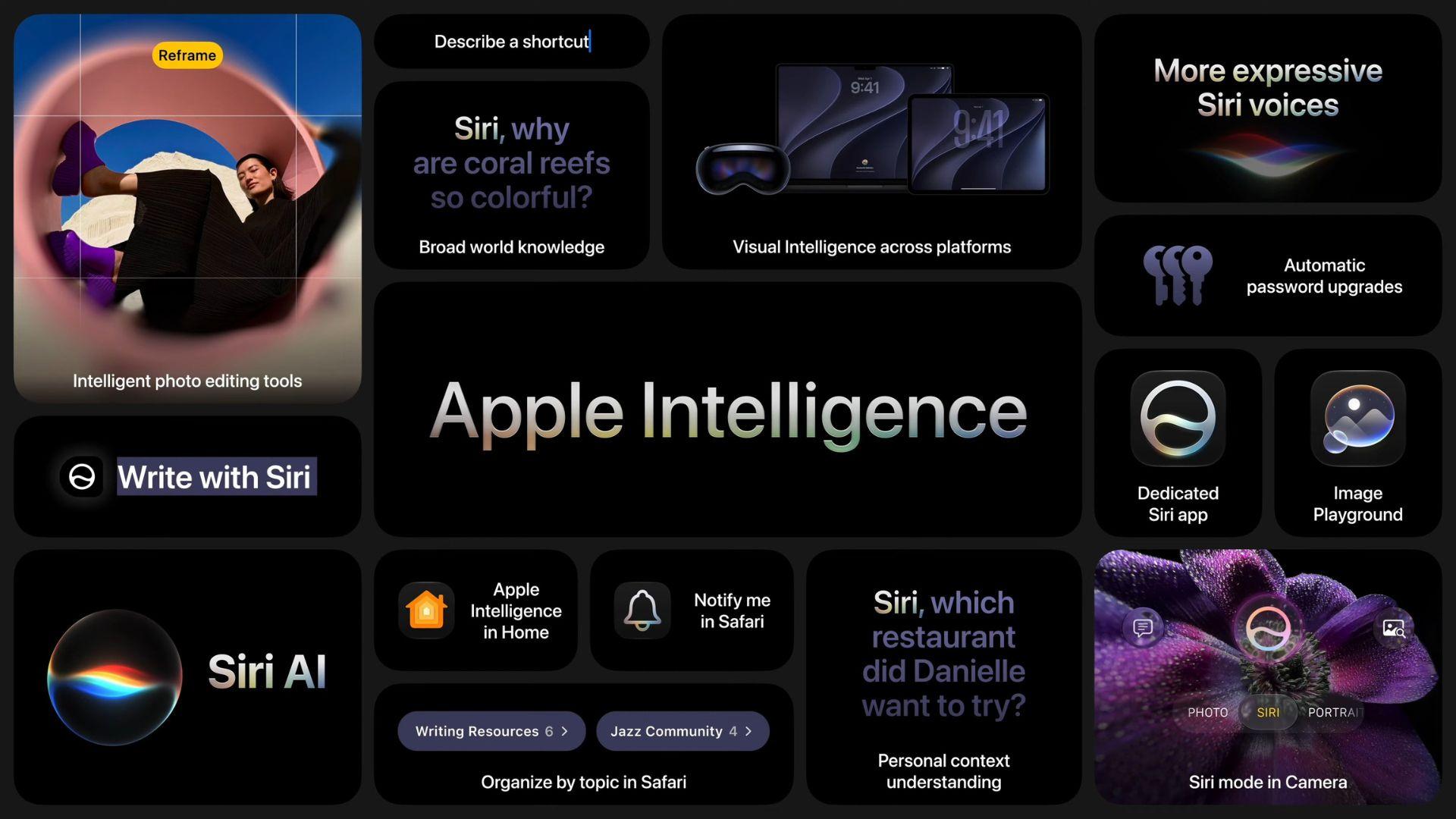
Apple used WWDC 2026 to lay out what iOS 27 will look like when it arrives this fall. The update comes with a rebuilt Siri, bigger AI tools across your apps, and a long list of upgrades to Photos, Messages, Wallet, and more.
- +All Apple Intelligence features you should expect in iOS 27
- +Siri AI: Apple’s rebuilt assistant
- +Apple Intelligence: All the new features in iOS 27
- +Other Apple Intelligence features in iOS 27
- +Which features come to iPadOS 27 and macOS 27
- +Which iPhones get Apple Intelligence in iOS 27
This article covers everything Apple announced, split into two parts: the new Siri AI and the broader Apple Intelligence platform.
Siri AI: Apple’s rebuilt assistant
Apple Intelligence: All the new features in iOS 27
Other Apple Intelligence features in iOS 27
Which features come to iPadOS 27 and macOS 27
Which iPhones get Apple Intelligence in iOS 27
This article covers everything Apple announced, split into two parts: the new Siri AI and the broader Apple Intelligence platform.
Siri AI is Apple’s most significant change to the feature since it launched in 2011. Apple describes it as an entirely new version of Siri, built from the ground up with AI at its core. The company built it in partnership with Google, using the technology behind Google’s Gemini models to power a new generation of Apple Foundation Models.
The result is an assistant that can hold natural back-and-forth conversations, take multi-step actions across apps, and answer open-ended questions. Apple says it is designed to compete directly with ChatGPT, Claude, and Gemini.
Personal context: Siri AI can read your messages, emails, photos, and notes to give you answers based on your actual life. You can ask it to find the restaurant a friend mentioned last week, pull up a hotel booking from an old email, or surface photos from a specific trip. Personal context also works with some third-party apps when developers build support for it.
On-screen awareness: Siri AI can see what is on your screen and respond to it. If you are reading a message about a potluck, you can ask Siri to brainstorm what to bring and then add a recipe directly to Notes, all without switching apps.
Conversational follow-ups: You can extend almost any Siri AI response into a longer conversation and ask follow-up questions. You do not have to restart from scratch each time.
Writing help: Siri AI can write, edit, and proofread across your apps, including most third-party apps. In Mail and Messages, it matches the tone you normally use with each person. If you usually send your manager short bullet points, Siri will draft in that style. If you write casually to friends, it adjusts accordingly. Siri also proactively checks your spelling and grammar as you type.
iOS 27 adds a dedicated Siri app that stores your conversation history and lets you pick up where you left off. Your conversations sync across your iPhone, iPad, Mac, Apple Watch, and Vision Pro via iCloud, so switching devices does not break the flow. On iPhone, you can open Siri using the wake phrase, the side button, or a swipe down from the Dynamic Island.
On iPhones with Apple’s most advanced on-device model, Siri AI offers more expressive voices, with options to adjust pace and tone. Systemwide dictation also gets a significant accuracy boost on these devices.
The devices that qualify for these advanced features are:
iPad M4 and newer, and Mac M3 and newer with at least 12GB of unified memory also qualify, along with Apple Vision Pro M5.
Siri AI requires Apple Intelligence hardware. Here is how the tiers break down:
The iPhone 15 and iPhone 15 Plus have a different chip from the Pro models, which is why they miss out on Apple Intelligence despite running iOS 27.
Apple processes simple requests on your device. More complex tasks go through its Private Cloud Compute servers, where Apple says your data is not stored or shared with anyone, including Apple. For the heaviest requests, a Gemini-powered cloud model handles the work. Apple says outside experts can verify its privacy promises at any time.
Siri AI launches in English first as a waitlisted beta. You can join the waitlist by going to Settings and opening Apple Intelligence. More languages will follow after the initial rollout. Siri AI is blocked on iPhone and iPad in the EU at launch for regulatory reasons and is unavailable in China. EU users on Mac and Vision Pro can access it. watchOS 27 also does not include Siri AI in the EU because it requires a paired iPhone to enable the feature.
Apple Intelligence is the broader AI platform that powers everything from photo editing to smart shortcuts. Here is what is new in iOS 27.
Photos gets four AI-powered editing tools:
Every photo you edit with Apple Intelligence will automatically carry a hidden SynthID watermark, a technology developed by Google DeepMind. The watermark is invisible to the eye and is designed to identify the image as AI-edited. Apple has not confirmed whether the watermark survives screenshots, social media compression, or exports to other apps.
Image Playground can now generate photorealistic images, not just illustration-style outputs, in iOS 26. You can also:
All generated images carry a SynthID watermark. Image generation runs on Apple’s Private Cloud Compute servers. Apple notes that daily usage limits apply to server-dependent features and that iCloud+ subscribers receive higher limits.
Genmoji gets a quality upgrade in iOS 27. You can now describe changes to an existing Genmoji, and it updates accordingly instead of generating a new one from scratch. The battery and heat load from generating Genmoji are also reduced. The default style remains 3D cartoon, with sketch options available.
Writing Tools now works through Siri AI, meaning you can generate text, refine drafts, and fix your writing virtually anywhere you type on iOS 27, including most third-party apps. Smart Reply in Mail and Messages can now match your personal writing style when suggesting responses. Mail suggestions can also take action in third-party apps.
Visual Intelligence, which lets your camera identify and act on what it sees, was iPhone-only in iOS 26. In iOS 27, it expands to other devices:
Additional reported capabilities include scanning nutrition labels into the Health app and pulling business card details into Contacts.
You can now describe what you want a Shortcut to do in plain language, and Apple Intelligence will build the workflow for you. You do not need to set up the steps manually. Refine it by describing changes, and the app will update accordingly. Example uses include automatically setting a morning alarm based on your first calendar event the next day or arranging app windows when your iPad connects to a Magic Keyboard.
Wallet gets a new Create a Pass feature powered by Visual Intelligence. Tap the plus button, select Create a Pass, and scan the barcode or QR code on any physical card. Wallet will turn it into a digital pass. You can also build one manually. Available templates include Standard, Membership, and Event, each with background color options and customizable fields for dates, membership numbers, contact details, coupons, and more. The auto-scan path requires the Siri AI beta. The manual path works without it.